|
Clear Prompts (scripts) are Key
Prompts are English commands written by you to describe what you want AI to perform on your image.
Clear and concise. You do not need to worry about grammar or punctuation – think of it like a conversation with another person, the editor. We all tend to talk in run-on sentences with little punctuation in our speech. That's ok, AI understands us, but it cannot read mind.
If you are not clear, AI's mandate is still to do something even if it is wrong, or not to your liking.
Most AI programs allow you to make adjustments, change, or reverse a previous command, though sometimes it is useful to simply start over.
Prompts: Start Simple
All prompts do not need to be overly complex. They should match the complexity of the restoration required. For example, this image of a baby showed multiple scratches (probably from folding). A simple prompt of "remove scratches" in Gemini 3.0 returned a perfect image.
A more complex restoration will require additional statements in the prompt to achieve your goal.
Sample Prompts for More Complex Jobs
- Remove scratches, cracks, and blemishes
- Recreate missing pieces
- Lighten picture, increase contrast
- Darken picture, maintaining natural contrast
- Remove reddish tint, restore natural coloring (specify color)
- Restore faded photo to normal lighting, sharpen image, increase contrast, keep original faces, do not substitute people
Note: Multiple commands can be included in the same script for more complex restoration. For example nearly all the above could be included in one command prompt. See the gallery for example before/after images and the prompts that made them happen.
Avoid Hallucinations
The biggest problem, especially for novices is that the AI program changes critical portions of an image, the most common is changing the face of a person, even substituting a different one. Sometimes a new element may be introduced, especially in the background. These are called hallucinations, and they happen most often when the image to be restored is in bad shape, is low resolution, blurry or otherwise difficult to repair .
One way to reduce the unwanted changes is to specify that original pieces are not to be replaced. Some applications give up too quick in restoring a face and substitute one from their databases. By specifying the original face must be kept, it simply makes the application work harder – which is its job.
Creative Prompts
Besides fixing damaged photos, AI can alter the image, slightly or significantly. An attractive treatment for some family photos is to turn them into sketches or apply an appropriate period-style of painting to them. These effects can be easily accompished through the prompt. See the Artististic Treatment page for fascintting examples.
Some of the creative treatments include:
- Make a pencil sketch of a photograph
- Paint it in a Norman Rockwell style
- Paint in a Monet, Picasso, etc style
|
|
Example of a Simple Prompt to Fix Scratches
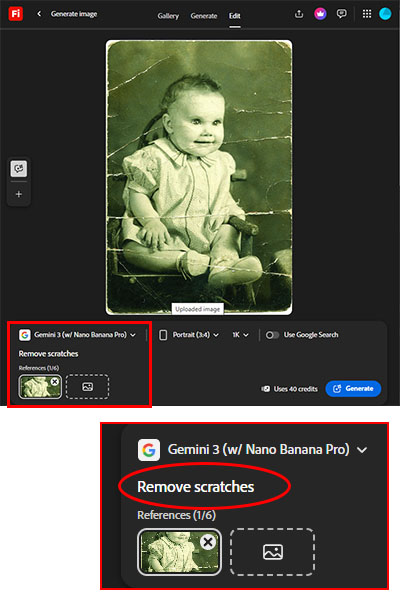
| This simple prompt resulted in a perfect restoration. |
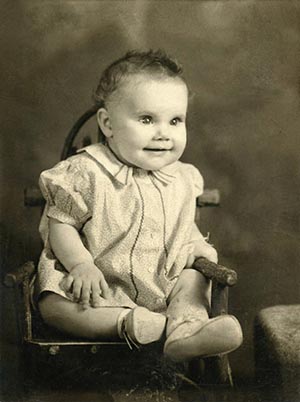
Note: This version did change the coloring to probably match the original print. The greenish tint in the current print is probably due to ageing.
| |