AI or A.I.
AI (no punctuation) is most common, though either version of Artificial Intelligence is acceptable,
AI actually comprises many area, some that have been around since the 1980s and before. These include Neural Networks (used in statistical analysis), Fuzzy Logic (used in defense mapping ), Machine Learning (Manufacturing), Natural Language Processing (Chatbots), Large Language Models (LLMs), and many more.
Generative Fill – The Magic of AI
With Generative Fill, you can improve images by adding missing pieces, removing scratches, smudges and other flaws. Also, lightness and darkness can be adjusted to help bring a picture back to life.
Unwanted Changes
AI Overview from Google – "Gemini doesn't inherently "replace" a face with another in standard photo restoration; instead, it enhances and clarifies the existing face, but it might generate unrealistic alterations (introducing new details or changing features) if prompts are vague . . . or if the image has Severe Damage, Low Resolution, Heavy Grain or Blur.
The model fills in gaps by predicting what a human face should look like based on its training data, resulting in a face that is altered and not appearing to be the same person."1
In other words, it tries to fix the original with equivalent pixel edits, if it cannot, it resorts to generative fill from their libraries. Note: You can suppress face changes by specifying in the Prompt "do not change or replace faces". See the Galleries for examples.
Footnote:
1 https://helpx.adobe.com/photoshop/desktop/create-open-import-images/create-images/edit-images-with-generative-fill.html
Popular Applications
Generative Fill, along with all AI routines, were not developed specifically to restore family photos. It is used in commercial graphic design, illustration, advertising, and many more applications. Luckily for the genealogist and historian, these AI routines are ideal for preservation and restoration of damaged images.
Leading Programs
There are many programs that offer AI services, both for general research and photo/image manipulation.
AI technology changes fast, and companies issue new versions and change their access fees frequently. This page was initially released February 2, 2026. A date is listed by each company noting any updates (found by this author). Examples of each are in the galleries.
Programs are listed in alphabetical order. Additionaly, many unknown companies are entering AI and operate off-shore. Those are not reviewed due to available information and time.

ChatGPT 5 – Parent company OpenAI. The multiple versions and revisions of ChatGPT programs have created some confusion among users. The Current main version of ChatGPT is 5.x and it produces very good edits and restorations. It was released in August 2025. Updates to a release are common and 5.2 is the current (Feb 2026). This is the recommended Chat version.
A new version called GPT Image 1.5 was released in December 2025, and it is primarily used (licensed) by other smaller independent companies. This reviewer found this version unreliable at preserving original faces, even when specifically instructed to do so. This is not for the casual user.
There is a free option and all ChatGPT examples on this site were conducted with it. The cheapest plan is only $8 a month. See the pricing page https://chatgpt.com/pricing for more information.
|
|
Leading Programs (continued)
Firefly 5 – Parent company Adobe. Firefly is Adobe’s entry into AI image editing. Known for Photoshop and many other professional level applications, Firefly produces accurate images, with no detected hallucinations, especially replacing faces. It also provides the highest resolution of most programs (for the non-pro versions). However, it does require more detailed Prompts to get the right brightness and contrast sometimes, something a novice may not be comfortable with.
There is no ongoing free account, only a 7-day free trial. The entry plan is reasonable, only $9.99 a month, cancelable anytime. This provides a very reasonable number of credits per month: 2,000. A typical edit requires 20 credits. See their Plans page for details.
Gemini – Parent company Google. Gemini has become this author’s go-to application. It continually provides reliable restorations and treatments, no hallucinations, does not replace faces when asked not to, and provides high quality images. It follows prompt descriptions, even lengthy complex ones. Gemini 3 (aka Nano Banana) was launced in November, 2025, with an advanced 3.1 (Nano Banana 2) introduced February 19, 2026.
There is a free account, and a reasonable entry paid account ($4). See the subscription page.
Kaze.ai – Independent Company https://kaze.ai This is apparently an independent company; it does not claim to be part of a larger one. However, information on it is slim, and it appears to be offshore. There is not physical contact into, the media contact Zihui Zhang with an email of support@dreamflow.art.
Disclaimers aside, I have used Kaze to great success, but only for a few months. I have an account which requires you to buy Credits. Their system has solved problems others stumbled on and I have found it dependable for accuracy.
A monthly plan can be purchased or Credits can be purchased, which it how use it, which is sparingly. A single restoration is about $1 (4 Credits) as of this writing, 2/1/2026. See their plans: kaze.ai/pricing.
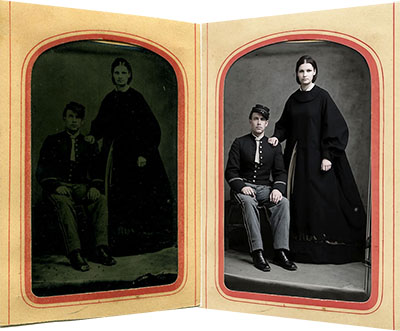
c. 1860s Tintype – Restoration by Kaze.ai
Other Companies
There are too many vendors offering fantastic results to list. New ones seem to appear every week, with headline-grabbing claims and offers. Buyer beware.
Disclaimer
Gary Clark has no personal or business relationship with any companies mentioned here, except for purchased subscriptions to their publicly available products at the listed prices. He currently has an Adobe Pro plan which provides access to Firefly, Gemini 3, GPT Image 1.5, and Flux.2, along with Photoshop and the suite of other publishing and editing applications. He also uses the free ChatGPT plan which currently provides ChatGPT 5.2.
| |
|
